project
Slide Sheets
What is it?
I built a website to take the slide decks that professors hand out and add a margin on the side to add notes.
I take a lot of my notes on my iPad using Goodnotes. The frustration I have always had was when a slide is densely packed or the professor starts going on a tangent, I had no clean spot to add those notes. For my finite element class that means free body diagrams, matrix partitions, and a lot of algebra in the margins, and none of that fits in the space PowerPoint gives you.
What I wanted
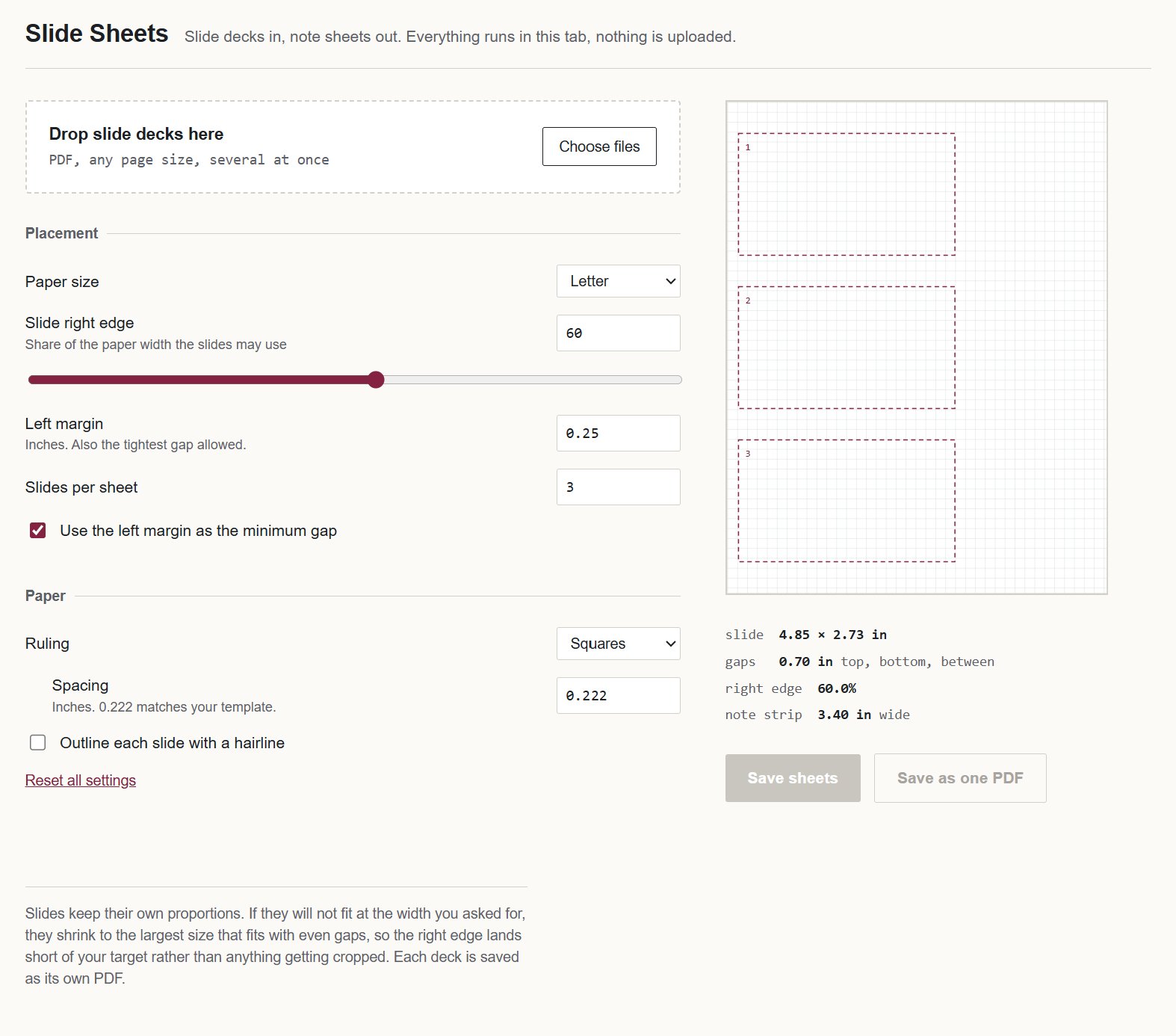
Three slides stacked down the left side of a letter page. And from there control how much of the page width the slide took up. A small margin on the left, and equal space above, below, and between the slides. Graph paper underneath instead of ruled lines, because I sketch more than I write.
The part that took the most thought was what happens when that does not fit. A 16:9 deck at that width leaves comfortable gaps. A 4:3 deck at the same width is too tall, and three of them run off the bottom of the page. Cropping is not an option and neither is squashing, so in that case the slides shrink to the largest size that still fits with even gaps. The right edge lands around 55% instead of 60%, and the note strip gets slightly wider. The slides always keep their own proportions and the layout always works out to even spacing.
How it works
It is a single HTML file. You open it, drop a PDF on it, and it hands you back a new PDF. Nothing is uploaded anywhere, because there is no server to upload to. The layout math and the PDF assembly both run in the browser tab, using pdf-lib to read the pages in and write the sheets out.
Slides are embedded as vectors rather than screenshots. Text in the output stays sharp at any zoom and is still selectable and searchable, and a full lecture's worth of sheets comes out around the same size as the original deck.
Using it
Drop in one PDF or a dozen. Each deck shows up in a list with its slide count, aspect ratio, and how many sheets it will produce. Click one to see its layout in the preview.
Worth knowing:
- Page ranges per deck, like 3-12, 20-last. Skipping title slides and agenda slides saves more paper than anything else.
- Ruling is squares, lines, dots, or blank, at any spacing.
- Paper size is Letter, A4, Legal, or a custom width and height.
- Everything else adjusts too: how much width the slides get, the margin, and how many go on a sheet.
- Save one PDF per deck, or all of them in a single PDF.
Settings stick between visits, so you set it up once for how your classes post their slides and then it is a drag and a click.